Buttons
Introduction
Buttons communicate actions that people can take. They are typically placed throughout the UI, in places like:
- Modals
- Forms
- Cards
- Headers
Buttons are just one option for representing actions in a product and shouldn’t be overused. Too many buttons on a screen can disrupt the visual hierarchy. Consider placing additional actions in a navigation rail, set of chips, text links, or icon buttons.
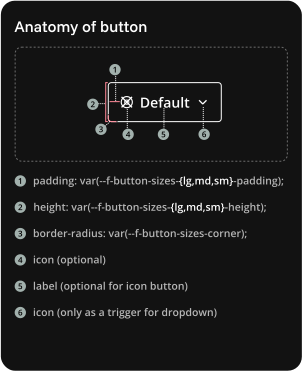
Copy guidelines
Some overarching guidelnes:
- Always sentense case except for a Funnel-specific product name.
- Always make sure that a button is accessible via keyboard
- Buttons strives to aim for AA accessibility (WCAG 2.2 criteria)
Button sizes
| Size | When to use | Allowed variants |
|---|---|---|
| Lg | For the main call-to-action (CTA). Should be used in header | Primary, Secondary |
| Md | Default size of all actions. | Primary, Secondary, Flat, Quiet, Danger, Link |
| Sm | For actions nested in a component, like in an accordion, table, dropdown | Primary, Secondary, Flat, Link |
Button variants
| Variant | When to use | Icon | Examples |
|---|---|---|---|
| Primary | For the main call-to-action (CTA) on a page or within a section. Should be used sparingly — ideally only one per view to draw attention. | Required | ”Save changes”, “Create campaign”, “Submit” |
| Secondary | For supporting actions that are important but not the main focus. Used alongside or near a primary action. | Maybe | ”Cancel”, “Preview”, “Edit” |
| Flat | For inline or low-emphasis actions, typically when visual weight needs to stay minimal but still noticeable. | Maybe | ”Learn more”, “Retry”, “Open details” |
| Quiet | For non-critical, subtle actions that don’t require strong emphasis — often used in toolbars, settings, or secondary UI elements. | Required | ”Dismiss”, “Skip”, “Close” |
| Icon | Similar use as Quiet but only icons is preferred when there are more than 2 next to each other | Required | ”Dismiss”, “Skip”, “Close” |
| Danger | For destructive or irreversible actions. Always use clear confirmation steps if this triggers data loss or deletion. | Maybe | ”Delete”, “Remove user”, “Discard changes” |
| Link | For navigational actions that move the user to another page, section, or resource — not for triggering in-place actions. | Maybe | ”View documentation”, “Go to settings”, “Read more” |
| Google sign-in | Only for Authentication to google | Google logo | In connect flow, export flow |
TODO
